
• Product
  • Suppliers
  • Manufacturers
  • Solutions
  • Free tools
  • Knowledges
  • Experts
  • Communities
Search


Disconnector Fault Analysis: Common Failures and Handling Guide

Rockwill
Field: Manufacturing
10Year<
China
 
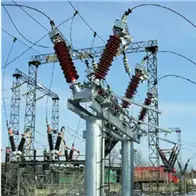
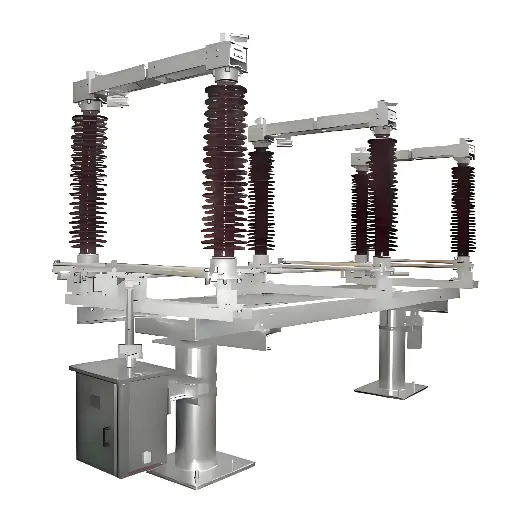
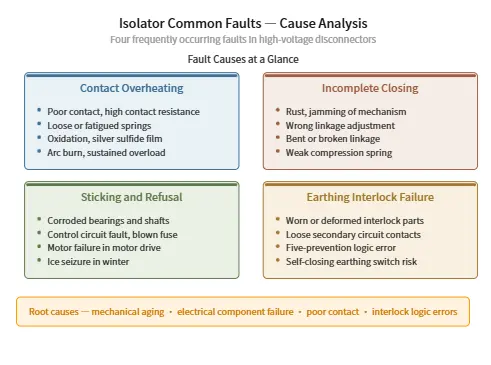
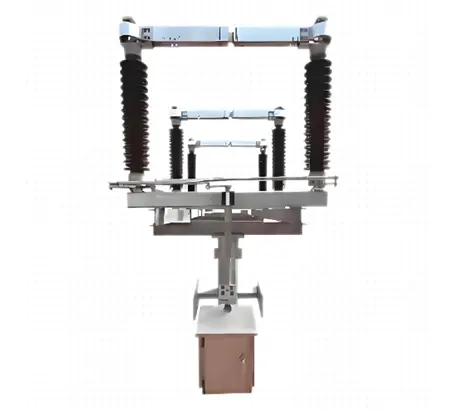
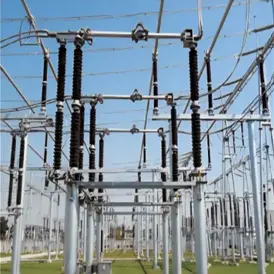
Disconnectors are among the most widely used high-voltage devices in the power system, and their safe, stable operation is critical. Below is a detailed breakdown of the four most common failures seen in service, along with their causes and remedy measures. 

iee-business

1. Contact Overheating

Causes

  • Poor contact: the moving blade and fixed contact meet over too small an area or close too loosely, increasing contact resistance.
  • Loose or aged parts: pressure springs or bolts loosen, spring pressure drops, or springs fatigue and fail, reducing contact pressure.
  • Oxidised or contaminated surfaces: surface oxidation, silver-sulphide deposits formed during long service, or worn/damaged silver plating exposing bare copper all degrade conductivity.
  • Arc burns: arcing at the contacts during opening/closing burns the contact surfaces, or improper operating force leaves the contacts misaligned.
  • Overload operation: the disconnector runs above its rated current for extended periods.

Remedy measures

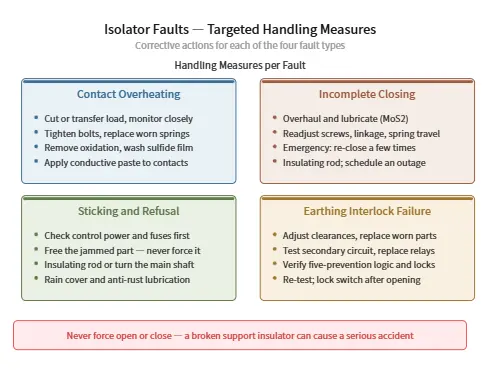
  • Load management (first priority): on detecting overheating, immediately report to the dispatcher, try to reduce or transfer the load, and step up monitoring.
  • Adjust and tighten: tighten loose bolts, adjust the length of the cross pins or rods, and make sure the moving blade engages the fixed contact to the required depth; inspect and adjust or replace the pressure springs.
  • Clean and dress: dress the contact surfaces with fine sandpaper to remove the oxide layer; for silver-sulphide on silver-plated contacts, soak them in ammonia solution and scrub with a nylon brush — never sand them directly.
  • Apply conductive grease: coat the blade and contact surfaces with conductive grease or neutral petroleum jelly to prevent oxidation and lower contact resistance.
  • Energised emergency treatment: where live-work safety clearances can be met, overheating at the busbar-side terminals of a disconnector can sometimes be rectified live by removing the busbar-side drop lead joints.

2. Incomplete Closing

Causes

  • Mechanical sticking and corrosion: the drive mechanism, bushings, linkages and other parts corrode and seize up through lack of maintenance, dried-out grease, or water ingress/accumulation.
  • Incorrect assembly or adjustment: misadjusted travel on the positioning screws, auxiliary switches or limit switches; the crank arm of the drive linkage not assembled to the standard (e.g. not forming a proper parallelogram linkage).
  • Deformed or damaged parts: bent linkage rods change their effective length, or drive connections fail through insufficient strength.
  • Weak springs: compression springs lose strength and can no longer provide the required closing-end pressure.

Remedy measures

  • Strip-down inspection and lubrication: dismantle and inspect the mechanism and corroded parts, dress out rust with fine sandpaper, replace any defective components, and apply a dedicated grease (e.g. molybdenum disulphide).
  • Re-adjust: adjust the positioning screws and auxiliary-switch travel; strip down and re-assemble the crank arms to the standard; adjust the push-rod length and spring compression.
  • Energised field action: if the contacts do not seat fully, open and re-close a few times; if they still will not seat, put on insulating gloves and use an insulating operating rod to push the three-phase contacts fully home, then schedule an outage for a thorough repair.

iee-business


3. Sticking During Opening or Closing (Failure to Open or Close)

Causes

  • Drive-mechanism failure: water ingress into the mechanism box rusts and seizes the shafts, pins, linkages, crank arms and base bearings; freezing can also prevent opening.
  • Electrical-circuit failure: one of the three-phase supply fuses not closed, break in the control supply, blown fuse, or thermal relay tripped cutting the supply; aged or failed secondary components.
  • Motor failure: on motor-operated mechanisms, the motor itself fails to start.

Remedy measures

  • Check the electrical circuit first: verify the operating supply is healthy and the fuses are not blown, then check each secondary component in turn (miniature circuit-breakers, changeover switches, contactors, limit switches, etc.) and replace any found faulty.
  • Clear the mechanical obstruction: locate and rectify the sticking part; never force the switch open, as this can snap the support insulators and cause a serious accident. If freezing is the cause, gently rock the mechanism to find the obstruction point.
  • Emergency operation: if the blade has become disconnected from the mechanism (e.g. a lost shaft pin), operate it with an insulating rod where personal safety allows, or turn the main shaft of each phase with a wrench.
  • Strengthen protection: fit a rain-proof cover and use anti-corrosion lubrication such as molybdenum disulphide; if the mechanism has congenital defects or problems are severe, replace it with a newer design.

4. Earthing-Switch Interlock Failure

Causes

  • Mechanical-interlock failure: the mechanical interlock fails — e.g. a spring pin vibrates out — or the interlock rod, striker plate and other mechanical parts wear, corrode or deform; if the plastic support of the energy-storage spring breaks or the spring deforms, the earthing switch may deviate from its true position while open, creating a serious risk of self-closing.
  • Electrical-interlock fault: loose secondary-wiring connections, faulty relays, or poorly or incorrectly positioned auxiliary contacts mean the electrical interlock conditions are not satisfied.
  • Five-prevention logic error: programme errors in the microcomputer anti-misoperation system, database configuration errors, or wrongly wired five-prevention locks (e.g. earthing-switch and disconnector lock tags swapped).

Remedy measures

  • Maintain the mechanical parts: check the interlock clearances, replace worn or deformed interlock rods, and lubricate the mechanism.
  • Troubleshoot the secondary circuit: use a multimeter to measure continuity and voltage levels in the interlock circuit, check for loose wiring, and replace faulty relays or reset auxiliary contacts.
  • Verify the five-prevention system: use the microcomputer anti-misoperation tester to validate the logic programme, update the software and re-verify the logic; correct any mislabeled five-prevention locks by swapping the tags.
  • Lock after operation: after repair, run a simulated interlock test to confirm the anti-misoperation function is restored. After opening a disconnector, always padlock it, to prevent it dropping back into the closed position from vibration — which could injure personnel or cause a close-onto-earth hazard.

iee-business

Summary

Most disconnector failures trace back to aged and corroded mechanical parts, damaged electrical-circuit components, poor contact, and abnormal interlock/anti-misoperation logic. In day-to-day operation and maintenance, take a "prevention first" approach: carry out regular inspections and infrared temperature measurement, clean oxidation from contacts and apply conductive grease in good time, and keep up anti-corrosion lubrication of the drive mechanism together with insulation testing of secondary circuits.

When a fault does occur, never force the switch open or closed — it can snap the support insulators and cause a serious accident. Correctly judge whether the problem is mechanical sticking or an electrical-circuit fault, then apply targeted repair or emergency measures to keep the power system operating safely and stably.

Edited From: Garca

Give a tip and encourage the author!
Topics:

Comments

Share your question or perspective
WhatsApp
Send inquiry
+86
Click to upload file
Download
Get the IEE Business Application
Use the IEE-Business app to find equipment, obtain solutions, connect with experts, and participate in industry collaboration anytime, anywhere—fully supporting the development of your power projects and business.
Login
or continue with
New here?
Register